Telerik RadGrid is a very powerful component that allows you to view, edit, order and filter data.
I'd like to share my experience using this component with linq to sql.
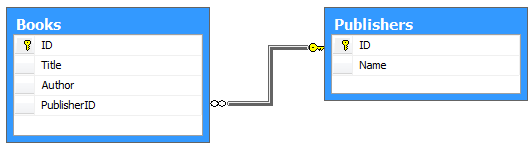
Using this component is very straightforward unless your entity contains references to other entities (in other words if your table have foreign keys to other tables, see DB diagram below). Very often such relations have a kind of reference data.

In this case you may meet the following difficulties:
- ability to display data field of referenced entity (except its ID, of course) in grid column;
- ability to sort and filter data set of your entities by columns which are references to other entities.
To understand the cause of these difficulties lets look at simple example.
Generated Linq to SQL model for the database schema above will look like the following:

Now, to display a list of Books in RadGrid you should implement databinding. To do this you usually subscribe to RadGrid's
OnNeedDataSource event and invoke
RadGrid.DataBind() in
PageLoad event handler:
protected void Page_Load(object sender, EventArgs e)
{
 if (!IsPostBack)
 {
     RadGrid1.DataBind();
 }
}

protected void RadGrid1_NeedDataSource(object source, GridNeedDataSourceEventArgs e)
{
 if (!e.IsFromDetailTable)
 {
     if (e.RebindReason == GridRebindReason.InitialLoad
         || e.RebindReason == GridRebindReason.ExplicitRebind)
     {
         RadGrid1.VirtualItemCount = Book.GetBooksCount();
     }

     int skip = RadGrid1.MasterTableView.CurrentPageIndex * RadGrid1.MasterTableView.PageSize;
     int take = RadGrid1.MasterTableView.PageSize;

     RadGrid1.DataSource = Book.GetBooks(skip, take);
 }
}
Here's our data access methods:
public static int GetBooksCount()
{
 using (var ctx = new DataClasses1DataContext())
 {
     return GetBooksQuery(ctx).Count();
 }
}

public static List<Book> GetBooks(int? skip, int? take)
{
 using (var ctx = new DataClasses1DataContext())
 {
     var query = GetBooksQuery(ctx);

     if (skip.HasValue)
     {
         query = query.Skip(skip.Value);
     }
     if (take.HasValue)
     {
         query = query.Take(take.Value);
     }

     return query.ToList();
 }
}

private static IQueryable<Book> GetBooksQuery(DataClasses1DataContext ctx)
{
 var query = (from book in ctx.Books
              select book);

 return query;
}
part of
*.aspx file that holds RadGrid markup:
<form id="form1" runat="server">
<div>
 <telerik:RadScriptManager ID="RadScriptManager1" runat="server"/>
 <telerik:RadGrid ID="RadGrid1" runat="server"
     OnNeedDataSource="RadGrid1_NeedDataSource"
     AllowCustomPaging="True"
     AllowPaging="True">
     <PagerStyle AlwaysVisible="True" Mode="NextPrevAndNumeric" />
 </telerik:RadGrid>
</div>
</form>
and the resulting grid:

Notice how we implemented pagind with just few lines of code.
By default RadGrid created columns and bound them to properties of our Book class (AutoGenerateColumns="True"). But we need to display Pubilsher's Name instead of
PublisherID.
To do this we need to change
AutoGenerateColumns to
False and write RadGrid markup by hand.
Here is the markup:
<Columns>
  <telerik:GridBoundColumn UniqueName="Title" HeaderText="Title"
      DataField="Title" DataType="System.String" />
  <telerik:GridBoundColumn UniqueName="Author"  HeaderText="Author"
      DataField="Author" DataType="System.String" />
  <telerik:GridBoundColumn UniqueName="Publisher.Name"  HeaderText="Publisher"
      DataField="Publisher.Name" DataType="System.String" />
</Columns>
and code behind:
public partial class Book
{

  public static int GetBooksCount()
  {
      using (var ctx = new DataClasses1DataContext())
      {
          return GetBooksQuery(ctx).Count();
      }
  }

  public static List<Book> GetBooks(int? skip, int? take)
  {
      using (var ctx = new DataClasses1DataContext())
      {

          //  Preload Book's Publisher field
            var loadOptions = new DataLoadOptions();
          loadOptions.LoadWith<Book>(b => b.Publisher);
          ctx.LoadOptions = loadOptions;

            var query = GetBooksQuery(ctx);

          if (skip.HasValue)
          {
              query = query.Skip(skip.Value);
          }
          if (take.HasValue)
          {
              query = query.Take(take.Value);
          }

          return query.ToList();
      }
  }

  private static IQueryable<Book> GetBooksQuery(DataClasses1DataContext ctx)
  {
      var query = (from book in ctx.Books
                   select book);

      return query;
  }
}
Here's what we got at this point:

Now we will add support for filter and sorting capabilities. To do this we should set RadGrid's
AllowFilteringByColumn and
AllowSorting to
True and change our DAL methods to support query filtering and ordering.
RadGrid gives us very good support here, because it can generate linq string that contains part of linq query's
where expression. To get this expression
we wrote simple
RadGridHelper class (see full source code in attachments below).
To use RadGrid expressions we need
DynamicQueriable (
CSharpSamples.zip\LinqSamples\DynamicQuery\DynamicQuery\Dynamic.cs) to mix dynamic linq expressions with static queries in DAL.
Finishing stroke is to make filtering case insensitive, in order to do this we should set
CaseSensitive="False" in RadGrid's
GroupingSettings.
Below are the resulting code linstings:
Resulting RadGrid markup:<telerik:RadGrid ID="RadGrid1" runat="server"
OnNeedDataSource="RadGrid1_NeedDataSource"
AllowCustomPaging="True"
AllowPaging="True"
AllowFilteringByColumn="True"
AllowSorting="True"
AutoGenerateColumns="False" GridLines="None">
<HeaderContextMenu EnableTheming="True">
<CollapseAnimation Type="OutQuint" Duration="200"></CollapseAnimation>
</HeaderContextMenu>
<PagerStyle AlwaysVisible="True" Mode="NextPrevAndNumeric" />
<GroupingSettings CaseSensitive="False" />
<MasterTableView>
<ExpandCollapseColumn>
<HeaderStyle Width="20px"></HeaderStyle>
</ExpandCollapseColumn>
<Columns>
<telerik:GridBoundColumn UniqueName="Title" HeaderText="Title"
DataField="Title" DataType="System.String" SortExpression="Title" />
<telerik:GridBoundColumn UniqueName="Author" HeaderText="Author"
DataField="Author" DataType="System.String" SortExpression="Author" />
<telerik:GridBoundColumn UniqueName="PublisherName" HeaderText="Publisher"
DataField="Publisher.Name" DataType="System.String" SortExpression="Publisher.Name" />
</Columns>
</MasterTableView>
<FilterMenu EnableTheming="True">
<CollapseAnimation Type="OutQuint" Duration="200"></CollapseAnimation>
</FilterMenu>
</telerik:RadGrid>
Resulting code behind:
protected void Page_Load(object sender, EventArgs e)
{
  if (!IsPostBack)
  {
      RadGrid1.DataBind();
  }
}

protected void RadGrid1_NeedDataSource(object source, GridNeedDataSourceEventArgs e)
{
  if (!e.IsFromDetailTable)
  {
      string where = RadGridHelper.GetFilterExpression(RadGrid1.MasterTableView, null);
      string orderBy = RadGridHelper.GetOrderBy(RadGrid1.MasterTableView);

      if (e.RebindReason == GridRebindReason.InitialLoad
          || e.RebindReason == GridRebindReason.ExplicitRebind)
      {
          RadGrid1.VirtualItemCount = Book.GetBooksCount(where);
      }

      int skip = RadGrid1.MasterTableView.CurrentPageIndex * RadGrid1.MasterTableView.PageSize;
      int take = RadGrid1.MasterTableView.PageSize;

      RadGrid1.DataSource = Book.GetBooks(where, orderBy, skip, take);
  }
}
Final Book class:public partial class Book
{
public static int GetBooksCount(string where)
{
using (var ctx = new DataClasses1DataContext())
{
return GetBooksQuery(ctx, where, null).Count();
}
}
public static List<Book> GetBooks(string where, string orderBy, int? skip, int? take)
{
using (var ctx = new DataClasses1DataContext())
{
var query = GetBooksQuery(ctx, where, orderBy);
if (skip.HasValue)
{
query = query.Skip(skip.Value);
}
if (take.HasValue)
{
query = query.Take(take.Value);
}
return query.ToList();
}
}
private static IQueryable<BookWrapper> GetBooksQuery(DataClasses1DataContext ctx, string where, string orderBy)
{
var query = (from book in ctx.Books
select book);
if (!string.IsNullOrEmpty(where))
{
query = query.Where(where);
}
if (!string.IsNullOrEmpty(orderBy))
{
query = query.OrderBy(orderBy);
}
return query;
}
}
Resulting RadGrid in action:
Attachments
radgridsample-src.zip Full project sources + DB (142 KB)